What is Split Tunneling? Why Gamers Need to Know About It
For gamers, accessing overseas servers and protecting privacy with a VPN is an essential tool. In a competitive world where every millisecond determines victory or defeat, finding ways to lower ping and secure the most stable signal is the ultimate goal. The powerful "Split Tunneling" feature is specifically designed to elevate the VPN experience for gamers by smartly managing and routing your internet traffic. It lets you enjoy the security of connecting to foreign servers alongside seamless performance for other apps on your device. Making it the ideal solution to reduce ping and maximize your gaming performance.
What is Split Tunneling?
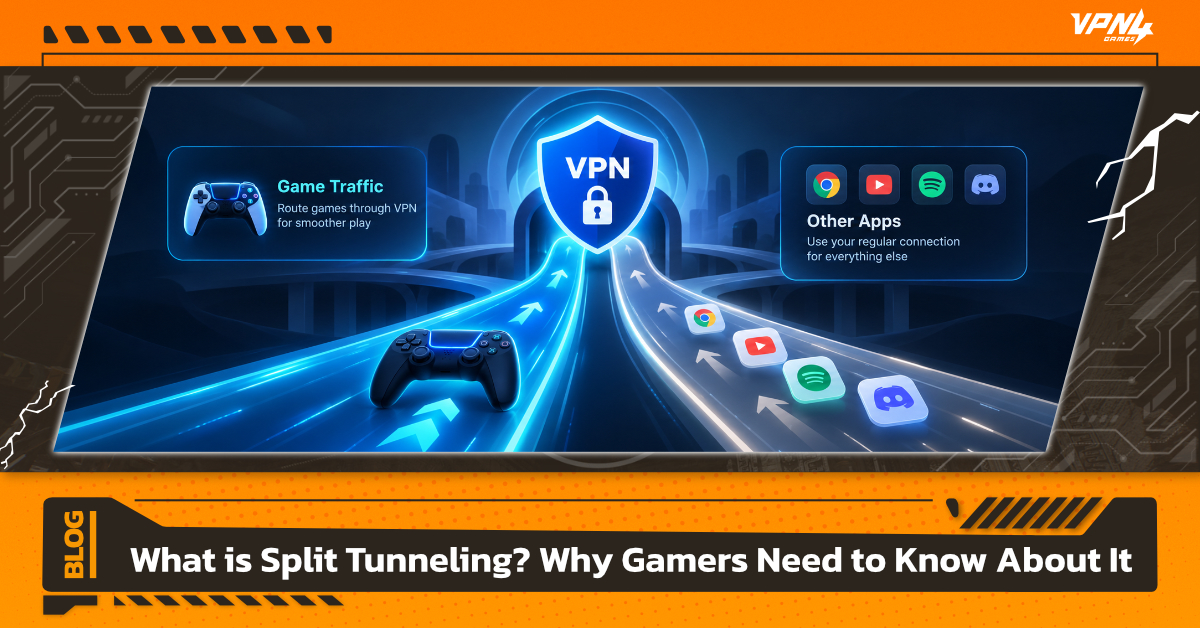
Split Tunneling is a VPN network connection technology that allows users to divide their data traffic into two simultaneous paths. One path routes through a secure, encrypted VPN tunnel, while the other runs directly through your regular Internet Service Provider (ISP).
To make it easy to visualize, standard VPN usage is like forcing every car in your household to drive on a single "special tunnel road",whether you are just going down the street or driving out of town—causing heavy traffic congestion. Split Tunneling changes that system into a "two-lane highway," where one lane is reserved for international travel (via VPN) and the other is for local driving (regular internet), resulting in maximum speed efficiency.
How Split Tunneling Works in Simple Terms
- Encrypted Traffic (Via VPN): Data from your selected games or applications is encrypted and routed through the VPN server to change your IP address or reduce route volatility.
- Bypassed Traffic (Non-VPN): Data from general websites, music streaming apps, or chat programs uses your high-speed home internet directly, without wasting time on the encryption process.
Why Gamers Should Use Split Tunneling
For hardcore gamers and casual players alike, having a stable ping and fast response time can decide between victory and defeat. Enabling Split Tunneling offers direct benefits for gamers:
- Reduces High Ping and Game Lag (Lag Drops): With a standard VPN, all system data, such as YouTube videos, OS updates, or Discord calls—is routed through the VPN, overloading your bandwidth and causing ping spikes. Split Tunneling lets you route only the game through the VPN, taking the shortest path to the game server for noticeably lower, more stable ping.
- Access Overseas Content Without Affecting Local Speeds: Want to connect to Japanese game servers while streaming music on Spotify or watching Twitch? Split Tunneling allows smooth cross-region gaming via VPN, while local browsing and streaming continue at full speed on your home internet without throttle.
- Prevents IP Blocks or VPN Detection by Game Servers: Some online games enforce strict Anti-Cheat or security protocols. If background applications connect through unexpected IP addresses, it might flag your account. Directing only the game application through a designated route reduces the risk of false security alerts.
How Many Types of Split Tunneling Are There?
- URL-Based Split Tunneling
- Routes only specific website addresses (URLs) through the VPN while allowing all other web browsing to use your regular internet. It is ideal for general web surfing or accessing geo-blocked websites in certain countries.
- App-Based Split Tunneling
- This is the most popular type for gamers. It lets you select specific executable files (.exe), routing only your games—such as VALORANT, Apex Legends, or Dota 2—through the VPN while keeping all other applications on your standard internet connection.
Basic Troubleshooting: What to Do If Your Game Still Lags or Fails to Connect with Split Tunneling
Sometimes, even after setting up Split Tunneling correctly, you might still experience game stuttering, high ping, or connection drops from the server. If you run into these issues, try checking and fixing them using these 3 basic steps:
- Ensure You Selected the Correct Executable File (.exe)
- A very common mistake among gamers is selecting the wrong file—choosing the game's Launcher (such as Riot Client, Epic Games Launcher, or Steam) instead of the actual game client.
- How to fix: Check your Task Manager or the game installation folder to select the actual game .exe file. For example, if you play VALORANT, you need to specify VALORANT-Win64-Shipping.exe instead of RiotClientServices.exe.
- Check Windows Firewall or Antivirus Settings
- Antivirus programs or Windows Defender can sometimes misinterpret the VPN's traffic routing behavior as suspicious activity and block the game's connection entirely.
- How to fix: Go to your Firewall settings and add both your VPN software and the specific game executable to the allowed list (Allow/Whitelist) so they can bypass the firewall completely.
- Switch VPN Server Locations
- If the game is still lagging, the issue might not be Split Tunneling itself, but rather an overcrowded target VPN server or unstable server routing.
- How to fix: Try switching to a server in a different city or a neighboring country close to the game server. For instance, if you are playing on a Japanese server and Tokyo is lagging, try switching to an Osaka server, or select a server with the lowest Latency/Load in your VPN app.
Security Concerns: How Safe Is Split Tunneling?
One common concern for many users is: "Will using Split Tunneling put my computer at risk of being hacked?"
The answer is: Split Tunneling is highly secure when used correctly. However, it is essential to understand how security works within this feature first.
When you enable Split Tunneling, your device's internet data is divided into two parts:
- Traffic inside the VPN tunnel: This portion receives full encryption, hides your IP address, and maintains high-level security based on your chosen VPN standards.
- Traffic outside the VPN tunnel (Bypassed Traffic): This data is transmitted directly through your regular home internet provider (ISP) without any VPN encryption.
Precautions for Use
- Recommended for: Online gaming, watching YouTube, listening to Spotify, or general streaming where speed and connection stability are the primary priorities.
- What to avoid: Never exclude high-security applications or devices from the VPN tunnel. This includes mobile or online banking, accessing confidential company data, or sending sensitive personal files, especially when connected to public Wi-Fi networks.
If you are a gamer dealing with high ping, game lag, or wanting to connect to overseas servers while streaming at the same time, Split Tunneling is a feature you shouldn't overlook. Just a few minutes of setup can squeeze maximum performance out of your internet connection, giving you both rock-solid gameplay stability and fast browsing speeds simultaneously.
And if you are looking for a service designed specifically for gamers, give VPN4Games a try. It is a premium gaming service that lets you easily set up route separation with just a few clicks. Reduce ping, cut down lag, and enjoy support for top online games for a smooth, seamless gaming experience!
Additional recommended articles